WHERE TECHNOLOGY MEETS GENEALOGY

The Computer Genealogy Society of San Diego meets on the 3rd Saturday of each month (except December) from 9:00 a.m. to noon on the campus of UCSD, University of California, San Diego.

Visit our website for more information and driving directions.

Tuesday, February 17, 2015

CGSSD Meeting Notice: Hal Horrocks

MEETING NOTICE

The Computer Genealogy Society of San Diego meets on the 3rd Saturday of each month  (except December) from 9:00 am to noon on the campus of UCSD, University of California, San Diego.  See our web page www.cgssd.org  for directions.  The next meeting will be held on 21 February 2015.  Here are the details:

9:00: User groups:  RootsMagic and Mac
10:00: Break, refreshments
10:20: Announcements followed by program:

Colonial Genealogical Records - And How to Find Them
presented by
Hal Horrocks  

As family historians, as we get further back into our ancestor’s lives, it becomes more difficult for us to find the records we need to fill out our family trees. The records for the Colonial period of our history are there, we just have to figure out how to find them. This presentation will explore ways to find the records from 1610 to 1776 that will help us in our search.
   
Hal Horrocks


 A  native Californian and longtime Orange County California resident, Hal Horrocks is a professional genealogist, teacher and lecturer. He has been doing family research for 15 years and is a member of Association of Professional Genealogists (APG), Genealogical Speakers Guild (GSG), Orange County California Genealogical Society (OCCGS), Guild for One-Name Studies, Manchester & Lancashire Family History Society (UK), and Cheshire Family History Society (UK). He has written several articles for publication in the UK. He is also the current President of OCCGS. 

In addition, he has developed a web site for the Horrocks surname that includes a one-name study, a DNA study, and family trees for Horrocks researchers. Hal has been giving lectures to genealogy societies throughout Southern California for the last 5 years.

We meet at the Robinson Auditorium complex on the University of California, San Diego (UCSD) campus in La Jolla. From North Torrey Pines Road, turn at Pangea Drive into UCSD. Free parking is available in the parking garage on the left; use any space other than those specifically reserved for UCSD vehicles. Signs will mark directions to our meeting room. Please refer to our website www.cgssd.org; or the Graduate School of International Relations and Pacific Studies website for directions.

Linda Brady
CGSSD VP-Admin

Sunday, January 18, 2015

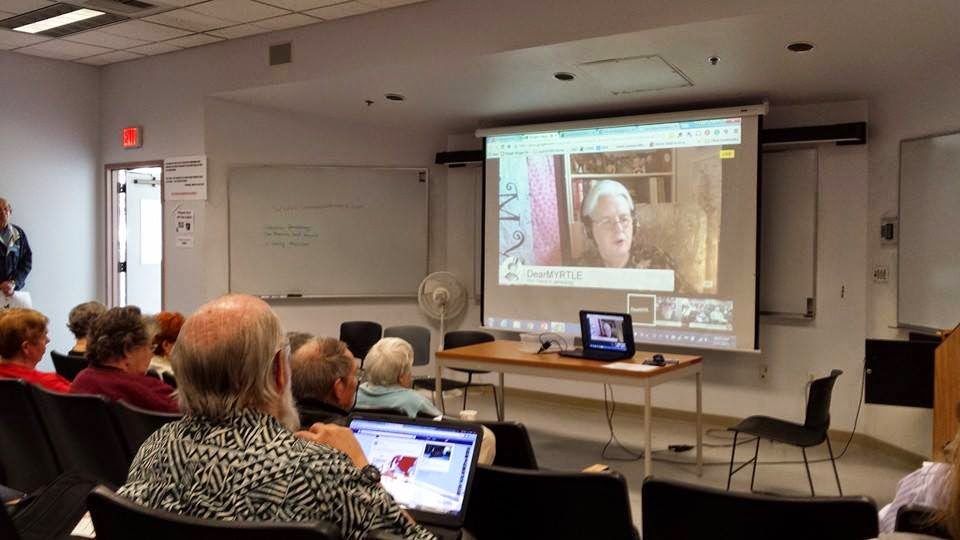
DearMYRTLE Visits CGSSD Virtually!

 Yesterday, DearMYRTLE visited CGSSD virtually via Google Hangouts On Air. Her presentation, "Google Hangouts: Enhancing Family Gatherings & Interviews", was enthusiastically received by our members present. This was our third "live" virtual presentation over the past few years. One of the nice features of Google Hangouts On Air is that it was recorded for future viewing.
DearMYRTLE
  While DearMYRTLE was broadcasting from Utah, Cousin Russ (Russ Worthington) was on hand to support and add additional information from his home in New Jersey. I might add that Cousin Russ gave me personal instruction about a week before the presentation and helped tremendously just before the meeting. Gary Hoffman, CGSSD's webmaster & Tech Guru was also very helpful, even having the right adapter to go from HDMI to the analog sound and projection system of our facilities.


Randy Seaver asking a question to DearMYRTLE


 I am definitely sold on using Google Hangouts. It's free and easy to use. I can think of a lot of uses this would be good for. I hope to find other speakers in the genealogical community that use this medium and have them present to us. 

 Resources from DearMYRTLE:
  • How to Hangout and Use Google+ http://bit.ly/MyrtsHowHangoutOnGoogle
  • Why Host Virtual Meetings http://bit.ly/MyrtsWhyHostVirtual

 Link to the recorded presentation: https://www.youtube.com/watch?v=SRFGQMEIbtE


Saturday, November 15, 2014

Cloud Genealogy Presentation

Here's a link to Gary Hoffman's presentation at the October Mini-Fair on the topic of Cloud Genealogy. This link will open a Google Presentation in your browser.
https://docs.google.com/presentation/d/14NyUWUc5_BW7vjHdzT-pL5NMpBWIHPOR_VEjaBkVpmM/edit?usp=sharing

Monday, September 8, 2014

CGSSD Meeting Notice

The Computer Genealogy Society of San Diego meets on the 3rd Saturday of each month (except December) from 9:00 a.m. to noon on the campus of UCSD, University of California, San Diego. See our web page www.cgssd.org  for directions.

The next meeting will be held on 20 September 2014 from 9:00 am to noon. Here are the details:

 9:00 AM  User groups: Ancestry.com with Del Ritchhart and DNA with Corlee Morris
10:00 AM Break, refreshments
10:20 AM Announcements followed up program: 

Dr. Joel Weintraub

"Crowdsourcing The Path To The 1950 U.S. Census"
The 1940 U.S. Census opened in 2012 without a name index.  A FamilySearch led consortium used 160,000 volunteers to name index that census in 4 months.  In addition, Joel and Steve Morse, over seven years with about 125 volunteers, developed free utilities to find which of 150,000 census districts someone was in, when a location or address is known.  These projects are examples of crowdsourcing.  Steve and Joel are now doing a similar project for the 1950 Census.  Joel will discuss differences between the 1940 and 1950 censuses that impacted their planning and project design.  The film scanning, publicity, volunteer response, Yahoo Group site, cloud storage, software, One-Step utilities, and project phases will be discussed.  All 233,800 1950 enumeration district definitions have now been transcribed.  Street indexes will also be completed for over 2,000 communities to help find 1950 census district numbers.


Joel Weintraub was born and raised in Manhattan. He is an emeritus Biology Professor at California State University, Fullerton and has won awards for his science teaching. He became interested in genealogy about 15 years ago, and volunteered for 9 years at the National Archives and Records Administration in southern California. Joel started transcribing streets within census districts in 2001 to help researchers search the 1930 U.S. Census (released in 2002). He was joined in the venture by David Kehs and Stephen Morse in 2002, and together, they have produced a number of online census searching utilities for both the federal and the New York State censuses on the Morse One Step Website. Joel produced locational finder aids for the 1940 census, and has given many talks on that census since 2006.  He now has the 1950 Census in his sights, scheduled to be released in 2022!  If you want to help with the 1950 project, email Joel at censusfiles@cox.net.


We meet at the Robinson Auditorium complex on the University of California, San Diego (UCSD) campus in La Jolla. From North Torrey Pines Road, turn at Pangea Drive into UCSD. Free parking is available in the parking garage on the left; use any space other than those specifically reserved for UCSD vehicles. Signs will mark directions to our meeting room. Please refer to our website www.cgssd.org; or the Graduate School of International Relations and Pacific Studies website (click here) for driving directions and a map.

Linda Brady
CGSSD VP-Admin

Friday, August 1, 2014

CGSSD Meeting Notice

The next meeting will be held on 16 Aug 2014 from 9:00 am to noon. Here are the details:

9:00: User groups: Roots Magic, with Chris Christensen; Macintosh, with Dona Ritchie.

10:00: Break, refreshments.

10:20: Announcements followed by program:

"Crafting Great Source Citations"
by Randy Seaver

    We all know that we should cite our sources, but it's hard to remember what goes first, what to include, punctuation, and more. Then the Internet came along and it's really complicated now. This presentation will cover source citation guides for genealogy, using content provider source citations, and using source citation templates in genealogy software programs to cite our sources.


    Randy Seaver is a native San Diegan. His ancestry is mainly colonial New England and Upper Atlantic, with some colonial German, French and Dutch forebears, and several 19th-century English immigrants. He has been pursuing his elusive ancestors since 1988, and has been online since 1992.
    Randy is a former President of the Chula Vista Genealogical Society and is currently the newsletter editor and research chair. He speaks to southern California societies, libraries and groups, and teaches "Beginning Computer Genealogy" adult classes at OASIS. He is a member of NGS, NEHGS, SCGS, SDGS, CGSSD and CVGS. Randy blogs daily about genealogy subjects at Genea-Musings (www.geneamusings.com) and the Chula Vista Genealogy Cafe (http://CVGenCafe.blogspot.com).

Wednesday, June 18, 2014

"Living on the Prairie" by Jamie Lee McManus Mayhew

[Jamie will be at CGSSD this Saturday to present "Across the Prairie: Land Records in the Public Land States".]


Living on the Prairie
By Jamie Lee McManus Mayhew

Hot summers, cold winters, dirt, bugs, mice, and snakes were an everyday part of living on the prairie during the expansion of our United States. Pioneers moving to the Great Plains soon realized that a log cabin was not going to be built on their homestead. Buffalo grass, a thick grass with heavily matted roots was to the prairie as trees were to the forest. Buffalo grass was the raw material available to build shelters for the new settlers. 
 http://en.wikipedia.org/wiki/Sod_house 

Many pioneers began their life on the prairie in a dugout cut into a hillside later to be expanded on several sides with sod to create a “cozy,” if not very clean, home. As time went on, the settlers would build an actual sod house with a door and windows. The laborious job of cutting sod with a spade was soon replaced with the use of the grasshopper plow which greatly eased the work of building a soddy. Strips cut approximately six inches deep and one foot wide by two feet long were used to build the walls. Laying the sod, grass side down and two to three rows wide, created a wall about three feet thick. A space was left for the door and windows were framed. Every few rows, the direction of the sod was changed to increase the strength of the wall. The roof was made in several ways most commonly by creating a wooden frame, sometimes covered with tar paper or straw, with a thinner layer of sod on top. Eventually, the roof might sprout a spring flower garden. Inside the house, the homeowner might hang cheese cloth from the ceiling to catch the bugs and grass that would drop down on the evening meal.
Library of Congress photo


The sod house was cool in the summer and warm in the winter although susceptible to heavy rain, they lasted a long time, frequently becoming a storage room or barn when a newer home was built. Wood was sparse so most of the soddies were heated with buffalo or cow chips. Eventually the family got used to the smell. Water was precious and hard to come by. Fortunate settlers settled near a spring or stream otherwise it was necessary to dig a well, a chancy and dangerous activity. Winter brought long days of loneliness with the nearest neighbor miles away.

We might think that this life was unimaginable and wonder why anyone would choose to live in this way but, although failure was high, the sodbusters brought settlement to the Great Plains by the early twentieth century thereby helping to expand the United States.

Sources:
“There are no renters here,” Homesteading a Sod House.  Women of the West Museum. http://theautry.org/explore/exhibit/sod/daily.html. (accessed 15 June 2014)
Vick Fite and Nancy Hendrickson, Frontier Traveler, The Kansas Soddy, http://www.frontiertraveler.com/kansas/the-kansas-soddy/. (accessed 15 June 014)
Sod house. n.d. http://en.wikipedia.org/wiki/Sod_house (accessed 15 June 2014)
Homestead Act: The Challenges of Living on the Plains. Nebraskastudies.org, , http://www.nebraskastudies.org/0500/frameset_reset.html?http://www.nebraskastudies.org/0500/stories/0501_0108.html (accessed 15 June 2014)

Homestead National Monument of America. National Park Service. http://www.nps.gov/home/index.htm (accessed 15 June 2014)

Wednesday, June 4, 2014

Family Tree Maker User Group Meeting 17 May 2014

Submitted by Ken Robison / FTM Group Leader


Here are the notes from our most recent meeting
 Together we know more than any of us alone.
FTM Users Group May 17 2014 

Getting into and out of trouble 

“Anyone can make a mistake to really mess things up you need a computer.” 

1. Open discussion              Questions, Problems, Issues or New Discoveries? 
2. Prepared discussion         Do you have two of the Same Tree?
    The Robison Taylor Family Tree.ftm
    The Robison Taylor Family Tree1.ftm

Step one Make a backup of both or all trees and name files so you can distinguish between/among them

Create Reports (In Publish)

1. Select “List of individuals Report”

                Review available reports

                        Click Create Report

                   Under List of Individual Report Options Individuals to include: All Individuals

             Set Report Title to File Name ( Robison Taylor Tree 1 Listing)

         Print out or save report to review and compare details to see if all individuals are in both trees

Note: To Switch between Reports Click on Collections to display available reports

2. Select “Media Usage Report”

Click Create Report

Under Media Usage Report Options Individuals to include: All Individuals 
There are many choices for Items to include and Filtering. Review the options and test 
effect by generating reports and see if anything is missing when items are selected or 
de-selected. 

Note: Like in Individuals Report above Use Report Title to Identify the File (RobTay_FT1)

If you find that one file has different information or individuals you can merge those individual records into the tree you want to be your master or complete file.

Once you are confident that you have all the information in one file you can rename that file, back it up and if you are brave (or foolhardy?) delete the unwanted file. Hover over file name and select option. If you select Delete you will be prompted for your Ancestry password before deletion.
Once deleted the file cannot be recovered! 

Resources: FTM Help Menu/Tutorials, Online videos–You-tube FTM, google The Barefoot Genealogist great short topics

Discussion:
Beyond the Basics A Guide for Advanced Users of Family Tree Maker 2011 Pgs. 74-80
1. Creating a file from a PC for use on a Mac
        Knowledge Base on www.familytreemaker.com
              Click on Technical Support, enter “5313” in search to get Mac Migration Utility
2. Moving Tree to a new Computer
3. Maintaining a tree on Two Computers (e.g. Desktop and Laptop..Husband & Wife or Cousin on different computers.

See you next time at the FTM meeting...